
Ever since Microsoft released Windows NT 3.1 all the way back in July 1993 a core file has been present, and remains present on every copy of Windows since.
The file we are interested in is the file NTOSKRNL.EXE, typically found as C:\WINDOWS\SYSTEM32\NTOSKRNL.EXE.
Why is this file interesting?
Every operating system has a kernel, which is the heart of the operating system. On modern Windows which is NT based this is NTOSKRNL.EXE, (The file name spells out NT Operating System Kernel).
It’s interesting because every month when Microsoft release their cumulative security updates for every version of Windows, you can bet a new version of the NTOSKRNL.EXE is released.
The file itself has embedded file version data.
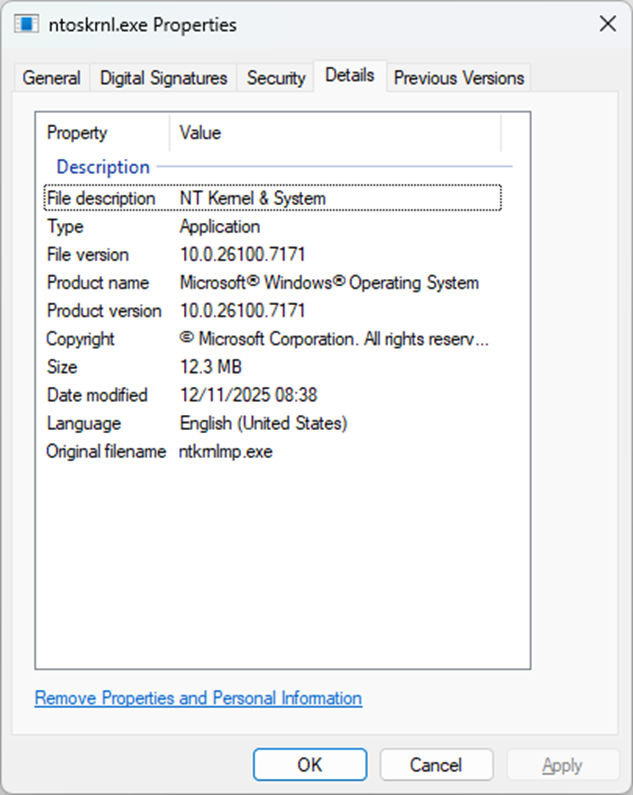
On my Windows 11 25H2 fully patched to November 2025 for example, I can see that the NTOSKRNL.EXE is version 10.0.26100.7171.
Now it’s important to understand how the version numbers are formed, in the example of 10.0.26100.7171
10 = Major version
0 = Minor version
26100 = Build Number (e.g. Windows 11 25H2)
7171 = Revision number
All Windows 11 25H2 machines would have the same “Build Number” for every Kernel they run, so essentially every NTOSKRNL.EXE on a Windows 11 25H2 machine would start 10.0.26100.Revision_Number, now it’s the revision number we are interested in.
When Microsoft compiles the code that makes up the NTOSKRNL.EXE they always increase the Revision Number.
Note – Don’t assume every Revision Number of the kernel is made public, and also expect gaps in the Revision Numbers you see in your estate. However when the December 2025 patches come out you can be sure on Windows 11 25H2 it’s going to be a number higher than 7171.
Using Tanium to see this at scale, and why this is useful to know?
Below is a Tanium question you can use to view the File Version of the NTOSKRNL.EXE
*Get File Version["C:\\WINDOWS\\SYSTEM32\\NTOSKRNL.EXE"] from all entities with ( Windows OS Release ID equals 25H2 and Operating System Generation equals Windows 11 )*
The question is focused on looking at the NTOSKRNL.EXE on Windows 11 25H2 machines, since they should all have the same version assuming they are patched.

Above is some sample data, now I can tell that any machine running a kernel below version 10.0.26100.7171 clearly isn’t patched to November 2025. Any machine running 10.0.26100.7309 is clearly running a newer kernel.
The idea of looking at the file version of the NTOSKRNL.EXE isn’t something new, most of the vulnerability scanners on the market do this when looking for certain CVEs.
TECH TIP – The NTOSKRNL.EXE can only be upgraded on disk when the operating system is rebooted following patching. Simply applying the monthly KB patch without rebooting isn’t enough to allow the file to replaced on disk.
How have endpointX taken this idea to the next level?
We created a custom sensor that our customers make use of which essentially has a list of all known NTOSKRNL.EXE versions and a date of when those kernels are released.
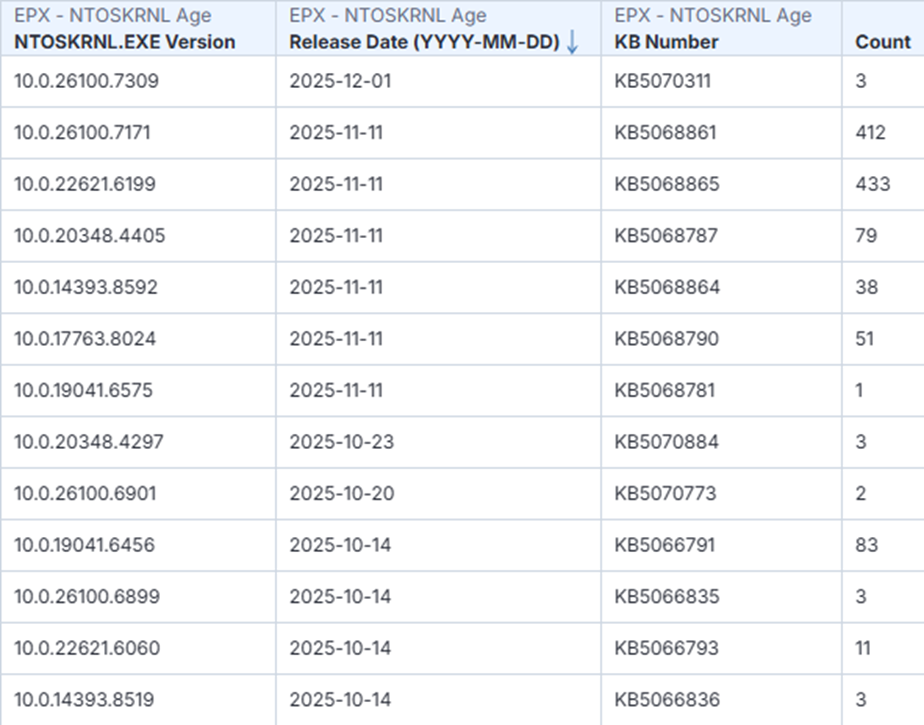
Using this approach we can easily see which machines don’t have the November 2025 security update applied. Think of this as a simple sanity check, without having to wait for any vulnerability scans to complete, it’s helps you to understand the core Windows OS patching position and take action immediately.
So whether you work in a Windows Operations Platform Team, or a Security Vulnerability Management function; checking the file version of NTOSKRNL.EXE on Windows can be a quick and useful validation point.
We currently track over 1,000 kernel versions and when they were released. Please reach out to endpointX if you’d like to understand this further.
Geeky trivia – The original file version of NTOSKRNL.EXE on Windows NT 3.1 all the way back in July 1993 was version 3.10.5098.1, and it was 770KB in size, much smaller than today’s kernel which is more like 12MB in size.